Running out of ports on your laptop? The Anker 7-in-1 USB-C Hub promises to fix that with 4K@60Hz HDMI, three USB data ports, dual card readers, and 85W pass-through charging — all for around $20. But with no Ethernet port and a charger that isn’t included, is it the right hub for you? We dug into the specs, buyer reviews, and the fine print.
This honest review covers what the Anker A83D2 actually does, each port in detail, the real price, what buyers love and complain about, and who should buy it versus who should look at Anker’s bigger hubs instead. No hype — just the facts.
The short version: This is a genuinely good compact hub from a brand you can trust. The 4K@60Hz HDMI works when your laptop, cable, and display all cooperate; the dual card readers are independently operated (photographers love this); and 85W pass-through charging keeps most ultrabooks topped up. The honest catches: there is no Ethernet port. The USB-C data port carries no video. Data speeds top out at 5Gbps (not 10). And you must supply your own charger. At ~$20 from Anker with an 18-month warranty, it beats every no-name hub in the same price bracket.
Best for: laptop users who need HDMI, USB-A ports, and card readers in a pocketable hub — and don’t need wired Ethernet.
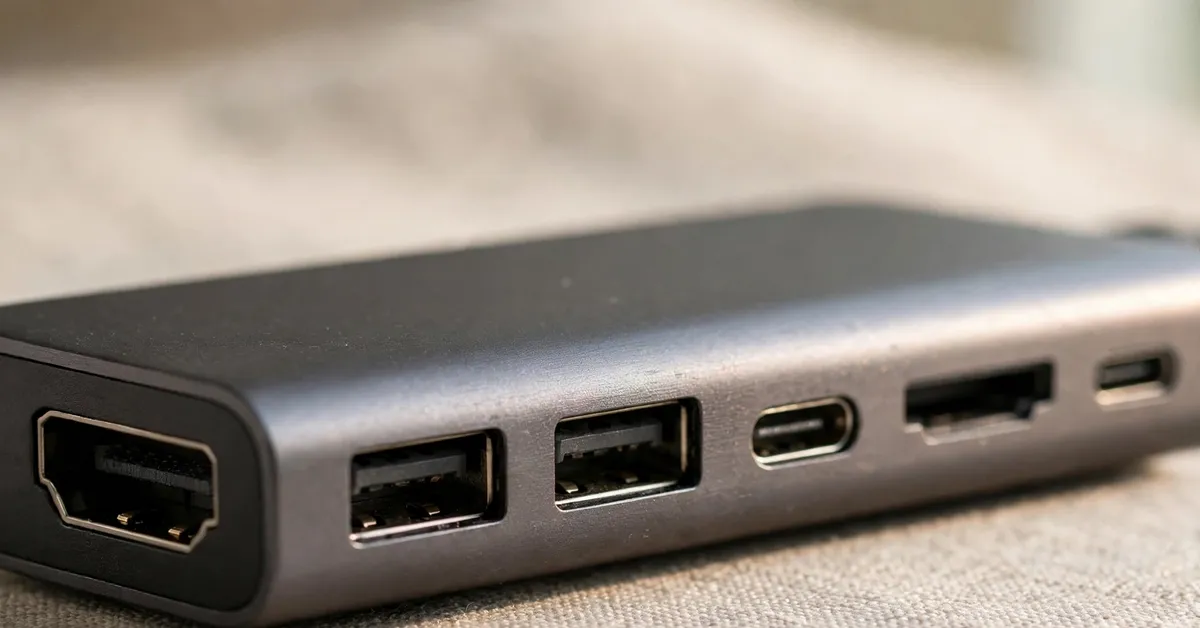
The Anker 7-in-1 USB-C Hub (model A83D2) is a compact multi-port adapter that turns one USB-C port on your laptop into seven: an HDMI output up to 4K at 60Hz, two USB-A data ports, one USB-C data port, SD and microSD card readers, and a USB-C Power Delivery input for pass-through charging up to 85W. It is plug-and-play on macOS and Windows. It needs no drivers. It draws operating power from the laptop itself.
In plain terms, it is the dongle that modern thin-and-light laptops force you to carry — except this one is from Anker, costs about $20, and covers the ports most people actually use every day: an external monitor, a mouse or keyboard receiver, a thumb drive, camera cards, and charging. It launched around April 2025 and sits in the middle of Anker’s hub lineup: smaller and cheaper than the Anker 555, more capable than bare-bones 4-in-1 adapters.
Who Makes This Hub?
Anker — one of the most established names in charging accessories, cables, and hubs. Unlike the dozens of no-name hub brands on Amazon with invented names and no support channel, Anker has a real website, real customer service, and a standard 18-month warranty on this hub. That warranty alone is worth something in a category where cheap hubs die after six months.
Anker’s hub lineup is well documented: the 555 (A30A4) adds 10Gbps speeds and Gigabit Ethernet for users who need them, while the 543 (A8357) includes Ethernet but drops two ports to slower USB 2.0. The A83D2 reviewed here is the portability pick — it deliberately skips Ethernet to stay small, light, and cheap. That is a design choice, not an oversight, but you should know it before buying.
Features — In Detail
4K@60Hz HDMI Output
The headline feature: HDMI that can drive a 4K display at 60Hz for smooth video, presentations, and everyday desktop work. The honest caveat: 60Hz needs your whole chain to cooperate. That means a laptop with DP Alt Mode, a good HDMI cable, and a display that accepts 4K60. One buyer reported maxing out at 30Hz on their setup, which is still perfectly fine for office work, browsing, and streaming. Only the HDMI port carries video; the USB-C data port does not.
USB Data Ports (2× USB-A + 1× USB-C)
Two USB-A ports and one USB-C port, each running at 5Gbps (USB 3.0 speeds). That is fast enough for external SSDs, thumb drives, keyboards, mice, and phone tethering. It is not 10Gbps — if you regularly move huge video files and need every last megabit, Anker’s 555 is the step up. For most people, 5Gbps is indistinguishable in daily use.
SD + microSD Card Readers
Both card slots operate independently, which photographers and drone owners will appreciate — you can pull files from a camera SD card and a microSD card without swapping. Many cheap hubs share one controller between slots or drop the microSD slot entirely. This is one of the A83D2’s genuine differentiators at the $20 price point.
85W Pass-Through Charging
Plug your own USB-C charger (up to 100W) into the hub’s PD input port. It passes up to 85W through to your laptop while you use every other port. The hub itself consumes roughly 15W of overhead, so a 100W brick delivers about 85W to the machine. That covers MacBook Air, most 13–14″ ultrabooks, and many 15–16″ laptops. Power-hungry 16″ workstations that need a full 100W+ should check their requirements first. Remember: no charger is included in the box.
Pricing Explained
The Anker 7-in-1 hub typically sells for around $20–25 on Amazon, and it has dipped as low as $18 — an all-time low that makes it a genuine bargain for an Anker-branded hub. There are no subscriptions, no upsells, and no accessories required beyond a USB-C charger you probably already own.
Full-Cost Summary
Anker 7-in-1 USB-C Hub (A83D2): ~$18–25.
USB-C charger for pass-through (if you don’t own one): $0–30, your choice.
No subscription, no software, no recurring cost.
18-month Anker warranty included at no extra charge.
4K@60Hz HDMI output — smooth video when your setup supports the full chain.
Independent SD + microSD readers — a real differentiator for photographers.
85W pass-through charging covers most ultrabooks and 13–14″ laptops.
Anker brand with 18-month warranty — not a disposable no-name hub.
4.5 stars from 2,224 ratings with zero reported connectivity issues from heavy users.
Compact, pocketable aluminum design — built for travel, not just the desk.
Around $20 — undercuts Anker’s own bigger hubs by a wide margin.
The Cons
No Ethernet port — if you need wired networking, look at the Anker 555 instead.
Data speeds top out at 5Gbps, not 10Gbps.
USB-C data port is data-only — it will not drive a second display.
Charger not included — pass-through charging needs your own USB-C brick.
Some users only get 4K@30Hz depending on their laptop, cable, and display.
100W in becomes ~85W out — the hub itself consumes about 15W.
May not fully power 16″ workstations that demand 100W+.
Who Should Buy This?
Best For
Laptop users who need HDMI + USB-A + card readers in one travel-friendly hub.
Photographers and drone owners who use SD and microSD cards regularly.
Students and remote workers docking to a single 4K monitor.
Anyone who trusts the Anker brand and wants an 18-month warranty at ~$20.
Not For
Anyone who needs wired Ethernet — get the Anker 555 or 543 instead.
Video editors moving terabytes who need 10Gbps data speeds.
Dual-monitor setups — this hub drives one display via HDMI only.
Owners of 16″ power-hungry workstations needing 100W+ charging.
Anker Hub vs Alternatives
Vs Anker 555 (A30A4)
The 555 adds 10Gbps USB speeds and Gigabit Ethernet, but it is larger, heavier, and costs notably more. Choose the 555 if you need Ethernet or move huge files daily; choose the A83D2 if portability and price matter more.
Vs Anker 543 (A8357)
The 543 includes Ethernet but two of its ports are slower USB 2.0. The A83D2 gives you faster 5Gbps on every data port and dual card readers, at the cost of no Ethernet. For most users, faster USB beats a rarely-used Ethernet jack.
Vs No-Name 7-in-1 Hubs
Generic hubs at $12–15 look tempting, but they routinely lie about 4K60, die within months, and offer no warranty or support. The A83D2 costs a few dollars more and comes with Anker’s reputation and 18-month warranty. That is money well spent.
My Exclusive Anker Hub Bonuses
When you pick up the Anker 7-in-1 USB-C Hub through my link, I am adding two original bonuses I created specifically to complement this purchase — not recycled freebies:
Bonus 1: USB-C Hub Setup & Troubleshooting Guide — how to get 4K@60Hz working (the full chain checklist), which chargers pair best for 85W pass-through, and fixes for the most common hub issues.
Bonus 2: Laptop Docking Station Buyer’s Cheat Sheet — a one-page comparison of when to choose a portable hub vs a full docking station, with port-count and wattage rules of thumb.
Click the download buttons above to get both bonuses instantly — no forms, no waiting.
Frequently Asked Questions
Is the Anker 7-in-1 USB-C Hub a scam or legit?
Legit. It is a real product from Anker, one of the best-known accessory brands in the world, with 4.5 stars from over 2,200 Amazon ratings and an 18-month manufacturer warranty. There is nothing scammy here — just check that its port selection matches your needs before buying.
Does it come with a charger?
No. The hub has a USB-C PD input port for pass-through charging, but you supply your own USB-C charger (up to 100W in, ~85W out to the laptop).
Can it drive two monitors?
No. Only the HDMI port outputs video (up to 4K@60Hz). The USB-C data port is data-only and will not drive a second display.
Does it have an Ethernet port?
No. If you need wired networking, consider the Anker 555 or 543, which include Gigabit Ethernet.
Will it charge my MacBook?
Yes for MacBook Air and most 13–14″ MacBook Pro models via 85W pass-through (with your own charger). The 16″ MacBook Pro under heavy load may want its original higher-wattage charger instead.
Final Verdict: Is the Anker 7-in-1 USB-C Hub Worth It?
Rating: 4.3/5
Buy it if: you want a compact, trustworthy hub with 4K HDMI, USB-A ports, and card readers for around $20 — and you don’t need Ethernet.
Skip it if: you need wired networking, 10Gbps speeds, or dual-monitor output.
✍️ My Personal Verdict
I’ve reviewed a lot of USB-C hubs, and the pattern is depressingly consistent: the cheap ones lie about their specs and die young. The Anker A83D2 breaks that pattern. What sold me is the honesty of the trade-offs — Anker didn’t pretend to fit Ethernet and 10Gbps into a $20 pocketable hub; they picked the ports most people actually use and executed them well. The independent card readers are the kind of detail that shows a company thinking about real users, not spec sheets. My only genuine gripe is the 5Gbps ceiling, but at this price that’s a fair compromise. If your laptop lives on a desk with one monitor and a pile of peripherals, this is the hub I’d recommend without hesitation.
This review contains affiliate links. If you buy through them, I may earn a commission at no extra cost to you. This helps keep the reviews honest and independent — I only recommend products I’d suggest to a friend.